Main Page Beginners Design Tips Get Traffic Earn Money Picks Codes

Are you a Successful Blogger?

Successful Blogging

  • Beginners can learn the basics about Blogging
  • Advanced Bloggers can learn how to take their blog up a notch.
  • Anyone can learn HOW TO GET MORE TRAFFIC
  • And more- Templates, Codes, and Tips etc.

What do you want to read about? Scroll down or check out our sidebar for topics.

We post at least daily so check back or subscribe to our newsletter.

Successful Blogging.com

Showing posts with label Beginner Stuff. Show all posts

In the beginning....Preperation

This is for the person who is curious about starting a blog or has just started to write one. It entails some basic steps to get your started.

There are some steps that you should take before you actually start your blog. These steps have to do with research. There are Five things that you should research before you actually sign up for your blog.

  1. Your topic. The result of this research should be the discovery of your niche or what it is that you can provide unique information on. How to research your topic? Do a search engine search of your topic and visit the blogs that turn up in your results. You'll know they are blogs if their web address contains blogspot, wordpress, etc. When you find a blog to look at check out their blogroll to find similar blogs.

  2. Your blog service. For a beginner, I would recommend Blogger. Blogger offers free software and hosting plus, it's extremely easy to use. When you get more confident, you can check out the other blogsite host and software options such as WordPress.

  3. Research the possible sources of post topic information. Make sure that you'll have plenty of places to search for new post ideas especially, when you hit a dry spell.

  4. Research the amount of time that you will be able to devote to your blog. Will you be able to post daily? What time of day will you be able to schedule your posting for? You should think about the reality of you blogging past the first month. Many blogger start strong and then fizzle. You should map out a realistic schedule that you can attempt to follow.

  5. Lastly, research a good name for your blog. You may want to keep in mind the possibility of purchasing a domain name in the future. This means that you want to make sure that the domain name and the blog names are both available. You can do an easy domain name look up at GoDaddy.

GoDaddy.com $6.95 .com Sale 120x90


Getting started in blogging is not difficult. Starting successfully and sticking with it take some work. I am going to devote more posts to the beginner. Stay tuned.


Deals on Guitars, Amps, Pedals and more

Image formats

In case you have not noticed, there are many image formats available on the web. They are all special in their own way- meaning that they are all preferred in their own way.

Raster images and vector images are the two main categories that images can fall in to. They differ in how they work and the amount of space they need to work in. Space is important as it refers to how much your site can handle and how long it takes to load a page.

Raster image formats (RIFs) are the most familiar to Internet users. A Raster format breaks the image into a series of colored dots called pixels. The three main Internet formats, GIF, JPEG, and Bitmap, are all Raster formats. The more pixels, the more detailed the image will be. Of course, the more pixels the more bytes or pace the image will take up.

Vector formats are vectors of data stored in mathematical formats rather than bits of colored dots called pixels. This allows for a strange shaping of colors and images that can be perfectly cropped on an arc.

JPEG was developed by the Joint Photographic Experts Group. It's primarily used for photographs. It is a lossy type of format, but most people can't really see the difference. You can adjust the amount of compression when saving a jpeg image, so you do have some control over the final output quality. JPEGs are extremely popular since they compress into a small file size and retain excellent image quality.

The more you compress a JPEG, the more "pixely" or degraded it will tend to look. For the best results, save your JPEGs at the "medium" or "High" setting and make a copy as a back-up before you change anything.

JPEGs can be compressed which means that the image on the hard drive can contain less bytes than the image is when it actually displays. Jpeg format is primarily used to hold a large number of colors.

Gif file format is another popular format, especially on the web. It's a lossless format that's ideal for graphics. GIFs can be either static or animated. is used to hold and transfer images in index color mode (not more than 256). It not suited to hold a photo realistic images, because it cannot contain more than 256 colors. It is mostly used to display animation and drawing pictures without blend.

BMP- This is the standard Windows image format. It's lossless and works well for pictures or graphics. It's an uncompressed file format, so it takes up lots of disk space.

TIFF- The current Tiff (Tiff 6.0) is a rich and flexible file format, supported by many programs. The format is capable to record halftone images with different pixel intensity. So, it is considered to be a perfect format for graphic data storage and processing. It isn't used so much on the web
because it's compression won't result in as small a file as a jpeg . When compressed, the file is usually about half the size of the original file.

Png - Portable Network Graphic is a lossless image format . This format was designed to replace the older and simpler GIF format. Like GIF you can make transparent images for buttons and icons, but it does not support animation. A PNG file can generally end up being twice the size of a JPG and three times larger than a GIF and some browsers, such as older versions of Internet Explorer and Netscape, incorrectly render them.

WMF- Windows Metafile format is a specific Windows format.

Generally, you will use the different formats;

GIF (usually non-interlaced)-mall images, like icons and buttons, line art, grayscale (black and white), and cartoons .

JPEG. Scanned images and photographs, large images or images with a lot of detail.


5 things to add to your sidebar

Your sidebar should be useful. It should offer a quick, short, and easy to use reference for your visitors. Here are 5 things that you should consider adding to it.

  1. Subscription link. Let people subscribe to your posts.
  2. Topic or label link. Show former post titles that people can easily reference.
  3. Search box. Let people easily search your blog.
  4. Something that identifies your blog as a blog that is a notch above a first time blog. This can be a social button or logo to a network.
  5. Something that personalizes your blog. Such as a picture of you, a snippet about you or a link to your "about me" page.
There are other items you can add, such as a counter and links. But, the five listed should be the priority.


Upstart your new blog

It is important to take time to develop your blog before you open the doors to invite visitors. Think of it as preparing your house before you put it up for sale. You need to update kitchen appliances and paint or do something else to make it presentable. Well, your blog is just like that.

If you are starting a blog with the intention of one day having a mega blog with thousands of hits per day, you need to take it slow. Make sure it is presentable for the masses and then test market it. This would be the development phase.

You'll need a good week just to get your layout right. This includes everything you need in you sidebar, the right header image, and some starter posts. Your sidebar should include navigation, links, and subscription information at a minimum. You can also introduce ad elements.

Then you can move on to your test market phase. This us where you simply post and get a few visitors to lend their comments concerning your presentation. You can find these visitors by leaving comments on other blogs first complimenting the blog owner and then asking them to check out your blog and tell you what they think. I'd be happy to look at your blog if you would like my opinion Ryan.

Adjust as necessary from what you learn from your test marketing phase. You may get a few comments that you don't agree with. However, you'll most likely get some wonderful constructive criticism concerning something obvious that you overlooked. This would be a sign of success in the process.
When you are done with your test marketing, you can work on promotion.


Shop the Newest Arrivals at Heels.com

10 Things Every Blog Post Needs to Include

Sometimes in the world of blogging you can feel yourself blogging on autopilot.
You get so use to blogging that you write without thinking that you are writing for a blog audience and not just for yourself. That is why you should have a list of items you need to include in every post.

You can write your items down and keep them close to you while you write and/or keep a mental note of them. If you are functioning on autopilot, you probably should have them written down nearby.

Here are the 10 items that I try to include in every post.

  1. Titles-Provides autonomy to that one individual post
  2. Labels- to keep things organized into categories and my tabs. You can use more than one.
  3. Links- For search crawler purposes, you should have at least one link in your post. Here are mine-
  4. e-mail me Page rank and links explained NY Times article on using links to rival websites.
  5. Topic- one per post. Mine is what every blog post needs.
  6. Advertising- just one per post or your blog will look cheapen
  7. An introduction- First paragraph, quick synopsis of what the post is about
  8. A Conclusion- Last paragraph- quick summary of your post
  9. A body- the meat of your essay.
  10. Optional- Photos/images
  11. Social Networking- such as Digg or add to my Technatori.


When I am finished with my post, I always ask myself, is there something that I forgot to add. I run through my list and make sure I've included everything I want to be included in every one of my posts.


Introduction to Blogging

The term "Blog" is an abbreviated version of "weblog."
A weblog is a web sites that maintain an ongoing chronicle of information, kind of like a journal.

Why write a Blog?
Some people write blogs to just simply keep an online journal.
Many blogs focus on a particular topic, such as blogging.
Whatever your reason, there is no right or wrong for a reason (unless you count the illegal).

Blog Features-
  • This biggest feature for any blog is that it is frequently updated or it is not updated.
    It would be hard to find something in the middle but, you could.
  • Many Blogs have links to articles or posts on other Web sites.
Physical Features-
  • Date header: The date the post is written or scheduled to post. Posts are generally presented in reverse chronological order (most recent first). Some blogs, such as Blogger ones, will let you disable this.
  • Title: Each post is given a title. A title helps you keep your posts organized and it gives the reader a subject of the post.
  • Permalink: A Permalink allows other bloggers to link to a post.
  • Post: Words, photos. and/or information with links.
  • Key words, often highlighted in boldface, which makes the post 'scannable' to the reader's eye.
  • Author Name: this can be disabled in some blogs. It tells the reader who posted the post.
  • Category or label: Individual postings are often labeled as part of a category.
    It is an excellent organization tool, especially if you will be using links for navigation.
  • Comments: Readers leave their own comments and reactions to the author’s post.
    This can be altered.
  • TrackBack: A way for one blog post to link to the post of another blog.

Most blogs share these;
  • A main content area with articles listed chronologically, newest on top. This will look like "labels or Newly Posted".
  • An archive of older articles.
  • A list of links to other sites, sometimes called a "blogroll".
  • One or more "feeds" like RSS or subscription links.

Most blogs have a method to allow visitors to leave comments. Pingbacks" or "trackbacks", can inform other bloggers whenever they cite an article from another site in their own articles.


Pingback/Linkback/Trackback

Really, it all about linking and finding out who is linking to you. Why is this important? Because search engines pick up on this and this can help you get noticed. Think of pingbacks (or pings) and and trackbacks as being kinds of linkbacks.

A Pingback is a method that blog authors use to request notification when somebody links to their blog. This allows authors to keep track of who is linking to them or working off of their content.

A Trackback is also a method for Web authors to request notification when somebody links to one of their documents. Blogger does not currently support Trackback.

A Backlink, which is supported by blogger, enable bloggers to keep track of other pages on the web that link to their posts.


The backlinks setting can be found under the Settings | Comments tab, and consists of a single, simple option to turn it on or off:

Blogger default templates are already set up with the necessary code for backlinks. However, if you have a custom template, or one of our templates from before this feature was launched, you will need to add the code yourself. Instructions for that are here.

Once everything is set up, you'll see a new link marked "Links to this post" next to the comment link for each post.

You should also enable people to e-mail your posts if you are going to use backlinks.

Show Email Post links?

Email Post links let your visitors easily email posts from your blog to their friends.

When your backlink is installed your post footer will look something like this.


posted by kubrickspick @ 11:28 AM 3 comments links to this post

If you click that link you will be taken to the post page, where the backlinks are all listed beneath the comments. Clicking the triangles next to each link will display a snippet of text from the page linking to you, as well as some author and date information.


If you want to turn off backlinks for individual posts, you can do so. The process is the same as that for turning off comments. Just edit the post in question and change the options that appear below the posting form:


Want to check to see who has linked to your blog?
There are a number of services that can help you.
wholinkstome.com/?
A word of caution.
If you are looking for 'quicky' linkings use caution when dealing with services that offer to do it for a fee. You never know who you may be linked up with.


The Story of Blogger

Blogger was founded by Pyra Labs, a small company in San Francisco in August of 1999. This was in the midst of the dot-com boom.

The company was founded by three friends. Blogger was funded by the friends doing web projects for big companies.

Blogger took off, in a small way, and eventually a bigger way, over a couple years. Blogger suffered through the dot-com bust.

In 2002 they had hundreds of thousands of users and Google purchased the company.


Since Blogger was launched in 1999, blogs have reshaped the web, impacted politics, shaken up journalism, and enabled millions of people to have a voice and connect with others.The  Blogger  publishing interface

A blog gives you your own voice on the web. It's a place to collect and share things that you find interesting— whether it's your political commentary, a personal diary, or links to web sites you want to remember.

To start a Blogger blog is quite simple. A blog can help you organize your thoughts.Some Blogger blogs command influential, worldwide audiences of thousands. Professional and amateur journalists use blogs to publish breaking news, while personal journalers reveal inner thoughts.

Whatever you have to say, Blogger can help you say it.

Here are some basics according to Blogger.

Blogger Comments let anyone, anywhere, offer feedback on your posts. You can choose whether you want to allow comments on a post-by-post basis, and you can delete any comments you don't like.

Access Controls let you decide who can read and who can write to your blog. You can use a group blog with multiple authors as an excellent communication tool for small teams, families and other groups. Or as a single author, you can create a private online space for collecting news, links, and ideas, to keep to yourself or share with as many readers as you want.

Blogger Profiles let you find people and blogs that share your interests. Your Blogger Profile, where you can list your blogs, your interests, and more, lets people find you (but only if you want to be found).

Design your blog

Whether you're starting your blog or just think it's time to give your existing blog a facelift, Blogger's user-friendly editing tools help you easily design a great-looking page.

Templates — The collection of templates will get you started with an attractive site right away without you having to learn any HTML, though Blogger also allows you to edit your blog's HTML code whenever you want.

Custom colors and fonts — When you're ready to take the next step, you can further customize our templates to create a design that perfectly reflects you and your blog.

Drag-and-drop page elements — Blogger's simple drag-and-drop system lets you easily decide exactly where your posts, profiles, archives and other parts of your blog should live on the page.

Blogger Mobile lets you send photos and text straight to your blog while you're on-the-go. All you need to do is send a message to go@blogger.com from your phone. You don't even need a Blogger account. The message itself is enough to create a brand new blog and post whatever photo and text you've sent.

Later, if your want to claim your mobile blog or switch your posts to another blog, just sign in to go.blogger.com and use the claim code Blogger sent to your phone.

We support most popular mobile carriers in the US and worldwide. If Blogger Mobile is unavailable from your provider, you can still send posts to your blog using Mail-to-Blogger.


Keeping up with the bloggers

Getting past your third post, or should I say, third day of posting.
Many bloggers start out with all kinds of energy and thoughts about how they will reinvent the blog through their words and postings. After a few days, the inspiration has cooled off and before they know it, blogging is yet another hobby of the past.
Here are some tips for sticking with it.

First of all, when you stumble upon a blog that has 150 postings and you are impressed with the size popularity of this blog, keep in mind that that blog has been around for awhile. That blog may look to you, a new blogger perhaps, like it is the Cadillac of blogs. You want to be that blogger with that success.

You can achieve blog success. It take time, patience, and a willingness to develop your blogging skill. Sorry, not everyone is born to blog, just as not everybody is born to be a professional athlete.

Consider these tips.
  • 1. When you start your blog, have a theme.Format your layout to fit this theme. If you like the look, you'll want to come back. Same with your reader. Try to be unique yet, interesting. Readers aren't really interested in your diary unless, you are a famous celebrity.
  • 2. What makes your blog popular by subject yet, unique with individuality? It may take a bit of time to find this niche. However, if you are Susie and you like to cook, focus on food and/or cooking. This will help you weed out the "TMI" or too much information.
  • 3. Blogger will let you post 50 postings in one day and then they will slow you down by throwing in word verification. This tells you that there us some limit to the number of posts you can post in a day. Why risk burn-out?
  • 4. Schedule your definite posting times. Decide, for instance, that you will sit down to write every Monday, Wednesday, and Friday at 9am. Write it down in your schedule. That way you will definitely make the time to do it. Then, if you decide to post additional posts, those are just bonus posts.
  • 5. Go easy on yourself. You're not a professional writer (most likely). Think of blogging as a therapeutic way to consider your thoughts or share them woth others.
  • 6. It's quality, not quantity of posts. Posting a daily post that always reads "I had a good day" does nothing for anyone. Posting three days a week with more substance is way better.
  • 7. In a funk? Do a search engine search on the topic. Stuff you read may inspire you with new ideas.
  • 8. Think ahead by subscribing to similar blogs and newsletters. These are great sources your new material.
  • 9. Keep track of your post's popularity my subscribing to analytics. Also, note which posts lead to the most inspired comments. This will help guide you towards popular subjects.
  • 10. Don't give up. Don't expect yours to be the most popular or most visited. Most blogs aren't.


10 Ways to Customize Without HTML

Not everyone feels comfortable with customizing their blog via html. Blogger html has it's own style of html as well which may seem intimidating.
Here is some good news for you.
You can still customize your blog to make unique without touching the html.
Here are 10 tips.

1. Check out the available templates. Maybe your blog just need a template update.
You can find the templates under the layouts tab in your dashboard. Some of the templates can be customized a lot while others not so much. Generally, the minima styles tend to me the most flexible. There are seven minima's to choose from. What is nice is that you can actually preview what your blog will look like in that style without actually changing it. Changing the template should not harm your elements.
When you find what you like, click "save template".

2. Fonts and Colors. This is located under the layouts tab.
Changing the font style or color can do a lot to personalizing your blog. You can preview as you customize. Be sure to save when you find what you like.

3. Upload a picture to your header.
This is actually quite simple. Go to your page elements section of your layouts tab and you'll see the header up there. Click on "edit" upload a picture from your computer and decide if you want to keep the header description with the picture.

4. Add subscription buttons.
You'll need to use Blogger in Draft for the fancy page elements. Again, go to layouts- page elements- add a gadget. Subscription links should be the third choice down.

5. Other Gadgets to Try.
Search Box- you can customize it to only or blog or the web.
Blog List- with snippets to blogs in your blog roll or blogs you recommend.
Labels- Excellent way to categorize your blog and be organized.

6. Use the text gadget to add some words. You can welcome people to your blog for instance.

7. Sign up for AdSense. This is another gadget that will help you get ads running on your blog. Why not make some money while you blog?

8. Move your page elements around.
When you click and drag on an element, the cursor should change to a change to a cross with arrows. You can easily move things around. Preview before you save. When you find what you like, don't forget to save.

9.Change the look of your comments.
Go to your settings tab, click on comments and scroll down. Unfortunately, blogger does not give an option for inline comments however, you can use the pop-up window. You can also restrict or enhance commenter abilities to your liking.

10. Customize with your formatting options.
Also located under the settings tab. You can decide how many entries to display on your first page, time and date options, and you can add something such as a signature that will always appear on your posts.

So there you go. 10 ways to customize without touching your html.


Get Concert Tickets on StubHub.com!

About Me

Why do you need an "about me" section?

Personally, I never really cared about "about me" and I never thought anyone else cared as well.
Then I kept seeing and hearing other bloggers/web-writers impress the about me importance on me.

The about me page is actually an essential tool to establish who you are as an author/authority. This puts a face on who they are listening to and helps readers understand and relate to what your blog is about. This is your opportunity to market yourself and your blog.


The about me section of your blog should do just that.
Tell about you.
Remember the old who, what, where, when, why and how?
This is a good spot to begin.

Who- Your name
What- What you do/What you blog about
Where- Where do you live?
When- When did you start blogging?
Why- Why are you writing this blog?
How- How are you doing it.

Answers these questions and develop your answers into something that represents an about me page that you would personally be interested in.

You may want to elaborate a bit more on your experience, if it is something that really sells your knowledge. Self promotion is critical to your success as a blogger

Anyone can write a blog.
Your target visitor is looking for a writing style they enjoy, learn from and/or relate to.

The Blogger Layout Anatomy

Layouts

The first time you used blogger you were probably in awe of the layouts that were available. After about your 10th post you probably got a bit more curious about everything.

With 38 layouts to choose from and then a layout and a font/color choice tab to visit, there are many ways to personalize your blog without knowing anything about coding.

So, let's visit the layout page. On it you'll find the major categories in the anatomy of your site. It's kind of like calling your arm an arm when it is actually an ulna, radius and humerus.

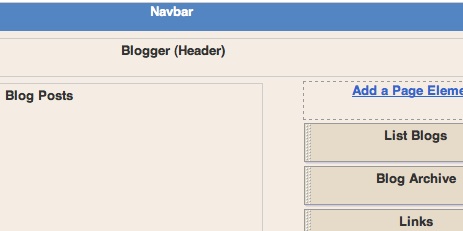
On top there is the nav bar which blogger makes kind of hard for you to alter. About all you can do via your layout tab is change the color of it. Go ahead and change this to something that goes with your color scheme. It's purpose is really only to navigate throughout blogger itself.

Then there is the header. Beginners may use this by stating the name of their blog along with a brief description. Many of us will upload an image and use it instead. One nice thing to do here is to go to your fonts and colors link and change the colors of the border if not just matching it to the page color to eradicate it all together. As you move on, you can alter the size of the header via your html code.

The post element can be altered. You can usually move one of your side bar elements above or below it (click and drag to move these around). You can set your post to include or not include labels, ads and more. Neat huh?

The best way to use the rest of your page elements is to visit Blogger in draft. This is because Blogger in Draft offers you a plethora of gadgets that you can add to your page.

When dealing with your layout elements remember;
  • Add them by clicking on "add gadget"
  • Move them around by clicking and dragging
  • Alter or remove them by clicking on edit
  • Preview them before you save
  • and Save when you are happy.
Cool.

FeedBlitz

Feedblitz is a wonderful service for Bloggers.They will take your blog entries and send them out via e-mail to your subcription holders. a


The free standard service (nightly updates, no user-based branding or custom graphics) is FREE for publishers and subscribers.

* All mail comes from FeedBlitz@mail.feedblitz.com
* All email will be easily recognizable because subject lines always start with [FeedBlitz]
* The FeedBlitz server tries to resend mail for up to 23 hours before giving up.

The "Pro" premium service lets you customize the look of your emails and the subscriber sign up landing page. It costs USD $4.95 per feed per month. Publishers with multiple feeds can sign up for the flat-fee "Pro Plus" service which lets you customize as many feeds as you like for USD $24.95 per month.

RSS aggregation requires a feed-aware browser or a custom aggregator (either on your desktop or a web service). Many people don't want the hassle or complexity. Email subscriptions work perfectly for them.

Visit and Leave Comments

Take advantage of the nav bar to surf the other blogs out there. Blogger loads them randomly for you. Be prepared for many language differenced. 

When you look at other blogs, you get ideas for your blog. There are some really well done blogs to look at. 

While you visit, it is important to leave comments. Not only will you make new friends :), but you will have a potential visitor your blog. 

Leave a quality comment like "Nice job, enjoyed your blog" or "nice photos". Blogger will automatically put a link to you when your name is posted on your comment.

Word Verification


I cannot tell you how much I hate having to go through word verification. It can be a pain especially when the words or letters are hard to read.

Google has embraced the whole word verification thing and with good reason. Users, like myself, find it a pain and it slows them down. Why is this good? Keeps away the bad guys.

According to Blogger;


The "word verification" option can be found on the Settings | Comments tab for your blog, and it looks like this:

If you choose "yes" for this setting, then people leaving comments on your blog will be required to complete a word verification step, similar to the one presented when you create a blog:

What this does is to prevent automated systems from adding comments to your blog, since it takes a human being to read the word and pass this step. If you've ever received a comment that looked like an advertisement or a random link to an unrelated site, then you've encountered comment spam. A lot of this is done automatically by software which can't pass the word verification, so enabling this option is a good way to prevent many such unwanted comments.

The Pro's and Cons of Comment Moderation

The easier it is to leave comments, the more you'll get. That's a fact. Unfortunately, there are some who have taken advantage of this by programming 'robots' to leave spam-like comments which are actually embedded with links to others sites- usually sites of question.

Blogger has made it easier to limit the junk comments. You, the blogger, have the choice to let anyone leave any kind of comment at a minimum, strictly restrict the ability of commenting , allow a range of abilities between the two or just not allow any commenting.

The thing about commenting is that if you are interested in traffic, you want as much commenting as possible.


How do I moderate comments on my blog? According to Blogger:


  • Enable comment moderation by selecting 'Yes' on the Settings | Comments tab.
  • Enter an email address if you want to approve or reject comments via email (optional).


You can find the comment moderation setting on the Settings | Commentstab, along with all of the other comment settings. It's just a simple yes/no option, and looks like this:

Choosing "yes" drops down an email form. This lets you moderate comments via email without affecting your regular comment notification setting. It is optional, since you can always moderate comments through the Blogger interface.

So set the option to "yes," enter a notification address if desired, save the settings, and wait for your next comment. All incoming comments will now go to a special "Moderate Comments" page, which you can find under the Posting tab:

On this page, you will see a list of all the comments that have been created but have not yet been approved or rejected. (This list excludes any comments made by admin members of the blog.) By default, they will be sorted by the time they were created, but you can also group them by their respective posts, by clicking the "Post Name" sort option at the top.

Each line in the list displays the beginning of the comment, the author's name, and the time it was created. Clicking the triangle to the left will expand the row to show the full text of the comment, along with "Publish" and "Reject" links, which you can use to approve or disapprove the comment. You can also select multiple comments and publish or reject them all at once, by using the check boxes on the left hand side and the buttons at the top or bottom of the list.

This entire process can also be done via email. If you entered an email address for moderation, you will get a message for each comment which will contain "Publish" and "Reject" links, as well as a link to the main moderation page for the blog. For example:


Backlinks


Backlinks display other webpages that link to your post
s.

To enable backlinks on your blog go to your Settings|Comments tab and select Show
Backlinks enable you to keep track of other pages on the web that link to your posts.

 For instance, suppose you write  a blog entry that your friend finds interesting. Your friend can then go  to his own blog and write  a post of his own about it. He can then link  back to your original post. Now your post will automatically show that your friend has linked to it. Your post   will provide a short snippet of his text and a link to his post. 


The backlinks setting can be found under the Settings | Comments tab, and consists of a single, simple option to turn it on or off:

Blogger terms

 
Blog client -  is software used to write, post, and edit your blog. 
Blogger-Person who writes a blog. Blogger is also the blog service name used for the Google blog system.  
Blog feed - The RSS/Atom or XML based system of displaying information aboutthe latest blog posts soon after they happen. An easy way to update readers. 
Blog hopping or Surfing- Following links from one blog to another using the links within the blogs.    
Blogosphere- The entire blogging community.If you blog, congratulations, you're a member.
Blogroll- Listing of blogs on a blog complete with links to the blogs. Sort of like of a promotional link to your friend's blogs. 
Blog site -The web location (URL) of a blog.
Collaborative blog -A blog  on which multiple users  post.  
Comment spam-  Robot “spambots” flood a blog with advertising in the form of bogus comments.  
 Flog-   A blog that's ghostwritten by someone, such as in the marketing department.
  Hits -Number of users to a blog.   
Linkroll-A list of  bookmarked links with brief descriptions.    
Permalink
Permanent link./Permalink- The unique URL of a single post 
Photoblog -A blog  containing photos.
Ping-The alert in the TrackBack system that notifies the original poster of a blog post when someone else writes an entry concerning the original post. 
Podcasting-  Posting audio and video material on a blog and its RSS feed.
Post- A Blog entry 
RSS-Really Simple Syndication is   feed formats used to publish frequently updated content such as blog entries.
RSS aggregator-Software or online service allowing a blogger to read an RSS feed.( Also called a reader, or feedreader.)
RSS feed-The file containing a blog’s latest posts. It is read by an RSS aggregator/reader.
  Subscribe-The term used when a blogs feed is added to a feed reader and allows readers to receive notification when there are new posts in a blog.  
TrackBack- A system that allows a blogger to see who has seen the original post and has written another entry concerning it. The system works by sending a 'ping' between the blogs. 
Vlog-A video blog; a vlogger is a video blogger  

Tips to write a better blog; Length of Post

Let's face it.
The attention span of the average internet surfer is short. The minute we get online we all come down with ADD. Most of us will read the first sentence and if it sounds interesting we will finish the paragraph.

By the time you hit the second paragraph you are looking for key words to see if you should stick around or at minimum, pick up a few interesting items. Am I right? Are you still reading?

The third paragraph should be doggone interesting or say something new or the reader will move on. Anything between the second and last paragraph probably will not get read unless it is your mother reading it. The standard suggested length of a blog post should be between 150 and 500 words. Anything more than this had better be substantiated with actual information if you want return readers.

Tips to write a better blog; Images

Simply stated, pictures make a blog entry much more interesting.
Not only do they break up the text but they give the reader something else to look at.
Many times someone is visiting a blog because they are bored and just trying to waste a few minutes. The last thing they want to see is a bunch of words.

Sometimes a picture can be the purpose for the blog post. If you took a picture at the lake and you noticed that there was an incredible sunrise in the background, there you go; your blog topic.

Whatever you do, don't steal pictures from someone else. Not only is it not cool but, it may be under copywrite and you can get into some trouble.