Main Page Beginners Design Tips Get Traffic Earn Money Picks Codes

Are you a Successful Blogger?

Successful Blogging

  • Beginners can learn the basics about Blogging
  • Advanced Bloggers can learn how to take their blog up a notch.
  • Anyone can learn HOW TO GET MORE TRAFFIC
  • And more- Templates, Codes, and Tips etc.

What do you want to read about? Scroll down or check out our sidebar for topics.

We post at least daily so check back or subscribe to our newsletter.

Successful Blogging.com

Showing posts with label Get Traffic. Show all posts

Give stuff away...get traffic......

There is a theory out there that if you give stuff away, you'll get traffic.

While this many not always be the traffic that you are looking for, it will get people use to visiting your site. The result will always be more traffic.

What you give away should make sense to your reader base. That is, if your blog topic is about raising kids, you probably should not bother giving away aftershave. What you give away should be of some value, not necessarily monetary.

Popular items given away are free graphics, templates, e-books, coupons, and promotional type items. To get these items hosts will usually ask that you do something in return. An internet/blog themed site may ask you to sign up for a newsletter for instance. Family/mom sites usually ask for a comment, sometimes with a theme. The site owner will then draw a winner from the comments

What else you need to know about give-aways:

  • Obviously, you must be cautious with the information that you give out or when downloading things.
  • You may want to take out a free e-mail address to use solely for contests.
  • Read the instructions and fine print very well. You may be signing up for something that you do not want.
  • Obey the rules of the give-away and remember your comment manners.


I host give-aways on my site. Check it out.


Bookmark and Share

Great Traffic Tips

We all want more traffic. Traffic means that people are reading what we write, they regard us as an authority, and they return for more. Ultimately, traffic means rewards for us both monetarily and otherwise.

To increase traffic, we need to reevaluate what we are doing, improve what is working and be reminded of the traffic tips that are out there. Here are some of the best tips around.

  • When you write, have a point and make it a logical point.
  • When you write, word your point in the eyes of the reader and what that reader wants to read.
  • Update often, daily at a minimum. Get your readers trained to come back to see what you have said today.
  • Keep your posts to one topic and cut out the clutter. Keep it Short and Simple.
  • Use the primary keywords from your advertising keywords in the title of your post and the seconday ones in the body of your post. Search engines like this.
  • You should also use your keywords for your links within your post.
  • Use links in your post especially when you quote or there is an implied definition.
  • Submit Your Blog to 5-10 directories weekly- try this
  • Submit Your RSS Feed To 5-10 directories weekly -try this
  • Ping your blog to 5-10 sites weekly -try this
  • Build Links To Your Blog, especially easy if you run more than one blog or have a website.
  • Visit other blogs and leave comments
  • Offer to exchange links with other similarly themed blogs and websites. You can also do this with those who comment on your site.
  • Submit your blog posts as articles to sites. Try this
  • Stir interest by posting something that may be controversial. Try to stay neutral in your post.
  • Use e-mail as a source. Include your blog address in your signature when you send out e-mails that have a future- such as e-mail with humor.
  • Be sure to promote your blog feed for posts
  • Consider promoting your blog feed for comments
  • Use a variety in your presentation such as with images
  • People like to read lists because they are easy to scan.
  • Be current in your post topics as opposed to 'so five years ago'.
  • Educate and update yourself daily on your subject.
  • Also write posts that will always be relative or timeless.
  • Be encouraging with your peers or those blogging on a similar subject.
  • Use sources and site who they are by linking to them.
  • Know how to write authoritatively yet, personable
  • Encourage your reader to participate in the post by asking for opinions.
  • Keep items concerning your personal life, such as your pets or kids to a minimum and in the 'about me' area. If people want to know more about you that's where they'll look.
  • Twitter, twitter, twitter.
  • I like Facebook too. You can encourage your friends find you on social media sites.
  • Add chicklets to Digg etc.
  • Guest post and invite guest posts.
  • Use several posts to form a series about one topic.
  • Use sidebar links to topics. Labels are a good way to organize.
  • Make it easy to comment. You can always go back and delete stupid ones.
  • Evaluate the whole of your blog in terms of colors and layout.
  • Be patient as there are a lot of bloggers out there and it does take time to acquire an audeince.
  • Consider using an advertising budget to advertise your blog.
Give me a day and I can write for hours on this subject. Now to practice what you read.

Back-to-School 300x250

15 Free Ways I promoted My Blog Today

This summary is not available. Please click here to view the post.

Promote your blog

After you have developed and test marketed your blog, it is time to promote it. This is the point when you feel like your blog is presentable to the masses. The header image works, the layout works and the navigation is pleasing. Now to get some traffic.

There are a lot of tips out there to help you. Most of these tips have worked well for the tipsters. Whether or not they will work your you may be a different story. But, it's worth a try.

When you start out, take it slowly and do not overwhelm yourself or your blog. You do not want to burn yourself out. Also, you need to take it slowly to make a proper evaluation of what works for you.

Here are some tips.
  • Comment on other blogs. The blogsite holder reads them as well as their visitors. Start by leaving a comment on my blog. You can also use a site such as blogs of note where there are bound to be plenty of good blogs with plenty of visitors
  • Check out sites like Digg, StumbleUpon, Del.icio.us, and Reddit . They can actually send you quite a few visitors. Don't do all at once though as your blog will become tired fast.
  • Invite a fellow blogger to guest blog on your site. A reciprocal guest blog is like sharing the wealth. I enjoy the invitation myself.
  • Have something that everyone wants and give it to them. Free downloads are a good way to get visits.

  • Purchase advertising through Google, Yahoo or even other blogs.
If you are interested in more personal help, feel free to contact me. Ryan


GoDaddy.com WebSite Tonight 125x125

List of Ping Services

It is usually recommended that if you want to increase traffic, you should post on your blog at least daily. This is because the more posts that you have, means your blog will have more pages and will therefore; you will have a better chance of being noticed by search engines.

Just how do the search engines find out about your daily postings?
Ping services
can help. These services allow you to automatically notify blog directories and search engines that your blog has been updated. These services are usually free. The more ping services you use, he better the chances of receiving traffic from search engines.


In addition to open ping servers, there are an increasing number of proprietary ping servers that gather information only for their own applications. Most of the major blog search engines operate such ping servers. Google's order of results is automatically determined by more than 100 factors, including our PageRank algorithm.

Here is a list of ping services.


Advertise- Get Traffic

Ready to reach out to the right audience?
There are many advertising options besides what Google Adwords.
Although, Google may dominate the search industry, there are other options that are less expensive.
Look for coupons to help you get started.

Here is an example.
Microsoft adCenter enables you to create, manage and optimize your search marketing campaigns to targeted buyers from a pool of 99 million potential customers .
Microsoft claims that and they convert at a higher average rate than Google and Yahoo users in three out of five categories
Sign up today and get up to $75 in free* clicks toward your first campaign.
Use coupon code: DY3KLQ5YVL263DB6 when you sign up.


adCenter's unique targeting capabilities let you target your audience by location, time, age and gender.

Sign up today and create your first campaign, ad and keywords. It is quick, easy and only costs $5 USD. After that payment, you only pay when someone clicks your ad. After you finish signing up, you will be able to monitor and customize your campaigns, import keywords and more.

Target your customers.
  • It is easy to target who you want to see your ad.
  • Create your ad.
  • Write a text ad that describes your products and services.
  • Enter your keywords.
  • Pick up to 100 keywords that your customers are likely to use.
  • Set your budget.
  • Set a monthly budget that reflects how much you want to spend.
  • Confirm and activate your ad campaign.

Promotional Guidelines: Offer valid only through 6/30/2008 (midnight Pacific Time), while supplies last. Promotional credit is valid only for new advertisers opening a new account with Microsoft adCenter. The $75 promotional credit does not apply to the one-time, nonrefundable $5 activation fee required to open a new adCenter account. Promotional credit not redeemed in click spend will expire 90 days after sign-up. Advertisers will be charged for advertising that exceeds the $75 promotional credit. Advertisers will need to suspend their ads if they do not wish to receive additional charges beyond the free credit amount or after 90 days from sign-up. Promotional credit good only to residents in the 50 United States and Washington, D.C. Limit: one promotional credit per customer. Promotional credit may not be combined with any other offer or discount, separated, redeemed for cash, transferred, sold, or bartered. There is a minimum bid requirement of $0.05 per click through. Search listings are subject to editorial review. See Advertiser Terms and Conditions for more details at sign-up. Other terms and conditions may apply.

More Traffic Tips

Get more traffic, get more traffic, get more traffic.
Sometimes that's all we are focused on. More traffic means that your blog is more interesting and has a following. This means that you are getting good at what you are doing and everyone knows it. It also means the possibility of more advertising revenue.

Some of these tips have been mentioned before but, I have included them because they are worth revisiting. Here are tips to get more traffic.

  • < Post often.
  • Keep submitting to search engine sites. There are many of them.
  • Harvest your blogroll. Invite new members ask to join other rolls.
  • Use social bookmarking.
  • Use your tagging, linking, and trackbacking.
  • Guest blog or invite a guest to blog. You'll introduce each other's visitors.
  • Comment on other blogs. It's a great way to invite comments from those you've commented on and those who have read your comments.
  • Publicize your blog.
  • Advetise. You can do this online or consider taking out an ad with Google or Yahoo or with another blog.


Visit Designers Imports for designer handbags

List of Social Bookmarks

Social Bookmarking sites are sites that allow users to share their favorite sites with other members. The result can lead to more traffic for the site owner. Social bookmarking is a method for Internet users to store, organize, search, and manage bookmarks on the Internet.

At a social bookmarking system, users save links to web pages that they want to remember and/or share. These bookmarks are usually shared on a bookmarking site.
This can bring a lot of traffic to the site posted.

Here are some bookmarking sites to check out.

del.icio.us

del.icio.us is a social bookmarking site that has rapidly taken off even more in popularity since being purchased by Yahoo.

Digg.com

Digg is social bookmarking and social networking that anyone can submit to and then anyone can comment on .

Yahoo My Web 2.0 Beta

Yahoo My Web 2.0 is a social search engine, which means that people and search technology are working together to create both better searches and a better search experience.

Flickr

Flickr is a social bookmarking and social networking site with a twist: it's all about photos.

Slashdot

Slashdot is the original social bookmarking site. Slashdotters can submit stories or links they find interesting and then users comment on them. Stories and sites have to be pre-approved.

Simpy

http://www.simpy.com/ is a social bookmarking site that allows users to "save, tag and search your own bookmarks and notes or browse and search other users' links and tags."

Popurls.com

Popurls.com is a conglomeration of about 10 different social bookmarking sites

Here are a few more


Get a 14-day FREE trial to Rhapsody

Making FriendsThrough Links

One way to get more traffic is to use links in your posts and include a blogroll.
To add a link to your post simply highlight the word(s) that will contain the link and then click on the link picture just above where you are typing. A pop-up window will come up asking you for the url that you want the highlighted words linked to.

Another idea is to go to your settings tab, click on "formatting" and scroll down to "Show link field". This will add to field below your post title where you can add a url for a link.

Everyone who claims to be a 'know-it-all' about blogging talks about linking and the importance of doing so. The best reasons to do it would be for traffic via referrals and to make friends who can help you get traffic or add content.


Now, there is a difference between quality links and non quality links. It is quality versus quantity. Personally, I like the quality links because they give credibility to your blog.


When it comes to search engine ranks, blogs can be links can be your friend. The best kind can be from other similarly themed blogs. The theme relevant links are often placed right in blog posts, and contain powerful link anchor text.

One way of creating blooger links is through 'blogrolls'.This are link lists with the intended use being that someone interested in the content of one blog will click on the link list to see what a similar blog has to say.

There are pro's and con's to this idea. Pro's would include relevant traffic to your blog from your link on someone else's blog. When used in moderation, search engines will pick up on these links as well which can help your ranking. When I say "in moderation" I mean that you should exert some level of caution, regarding link exchanges with non-theme relevant blogs, as those incoming links might not receive full value.

The con's of a link list come into play when your site is listed on an irrelevant site or an irrelevant site is listed on yours. This is easy to control by making sure that you are the link list maker and not some third party.Too many links will certainly devalue your site especially in the eyes of search engines and potential return visitors.
Blogger also has some suggestions on the getting more links.

Set your blog to Send Pings. When this setting is activated, your blog will be included in various "recently updated" lists on the web as well as other blog-related services.

Activate Your Navbar. Do this and you might start to see the effects right away! One of the features on the Blogger Navbar is a button called NextBlog — click it to visit the next Navbar-enabled blog.

Install Email This Post. If you use Email This Post on your blog, people will be able to forward your posts to friends. This may not have an immediate impact on your site stats but it enables others to publicize your blog for you.

Turn on Post Pages. By publishing every post as its very own web page with Post Pages, you ensure that your entries are way more link-able and more attractive to search engines.

Turn on your site feed. When people subscribe to your site feed in their newsreaders, they’re very likely going to read your post.

Add your blog to Blogger's listings. When you add your blog to our listings it shows up in Nextblog, Recently Updated, and other places. It's like opting-in to traffic.

Write quality content and do it well. If your "style" is bad writing, worse grammar, no punctuation, and an ugly design, that might be okay for a niche crowd. But the idea here is to achieve mass appeal, so fix yourself up a bit.

Publish regular updates. Simple: the more you blog, the more traffic you’ll get.

Think of your audience. A good way to build an audience is to speak to one in particular. When you keep your audience in mind, your writing gains focus. Focus goes a long way toward repeat visitors.

Keep search engines in mind. There are a few things you can do to make your blog more search engine friendly. Use post titles and post page archiving. This will automatically give each of your post pages an intelligent name based on the title of your post. Also, try to be descriptive when you blog. A well crafted post about something very specific can end up very near the top results of a search.

Keep your posts and paragraphs short. Strive for succinct posts that pump pertinent new information into the blogosphere and move on. Keep it short and sweet so visitors can pop in, read up, and click on.

Put your blog URL in your email signature. Think of how many forwarded emails you’ve seen in your day, and just imagine the possibilities.

Sumbit your address to blog search sites and directories. People look for blog content at Technorati every day, are you on their list? You should be. Submit your blog's url to Technorati, Daypop, Blogdex, Popdex, and any other site of that ilk you come across.

Link to other blogs. Links are the currency of the blogosphere and it takes money to make money so start linking.

Install a blogroll. It's a very simple yet effective social networking scheme and it has the same result as a simple link if not stronger: traffic! So if you don't have one yet, sign up for a blogroll and get that link-list going.

Be an active commenter. This is in the same vein as linking. Most comment systems also provide a way for you to leave a link back to your blog which begs a visit at the very least. So if you feel inspired, leave a comment or two in your blog travels. It behooves you.


High Quality, More Affordable, Post Cards!


What is a Link Directory?

Often called a web directory, a link directory is a directory on the web which specializes in linking to other web sites and categorizing those links.

Not to be confused with a search engine, it lists web sites by category and subcategory. The categorization is usually based on the whole web site, rather than one page or a set of keywords as a search engine uses . Web directories often allow site owners to directly submit their site for inclusion, and have editors review submissions .


Directories have various types of listings, often dependent upon the price paid for inclusion:

* Free Submission -
* Reciprocal Link - a link back to the directory must be added somewhere on the submitted site in order to get listed in the directory
* Paid Submissions - a fee is charged for listing the submitted link

* No Follow - there is a rel="nofollow" attribute associated with the link, meaning search engines will not follow the link.
* Featured Listing - the link is given a premium position in a category
* Bid for Position - where sites are ordered based on bids
* Affiliate links - where the directory earns commission for referred customers from the listed websites

Human-edited directories

A human-edited directory is created and maintained by editors who add links based on the policies particular to that directory.The benefit to these directories is that they are often targeted by SEOs on the basis that the links f will improve rankings in the major search engines.

An example would be the Open Directory Project and the World Wide Web Virtual Library.


SEO's use submission of websites to web directories to get vital back-links for the submitted web site. Manual directory submission is a tedious and time consuming job and is often outsourced by the webmasters.

Bid for Position directories

Bid for Position directories are paid for inclusion web directories where sites are ordered according to their bid amount. The more you pay, the better your chances are. When your link is placed on another site, it is more likely that the visitors of that site will also visit your site. This increases the number of hits on your site. But keep in mind, this doesn’t mean that linking with all the sites you come across can add popularity to your site.

Search engines give a lot of weight to the links. Caution should be given to the site which hosts your link or you host a link for. Quality websites can give you good sales and traffic, and a link to a questionable quality site can impair your business.

A free submission can offer you to add your websites to a link directory without having to link back to our website. Often, your listing will contain the nofollow tag in your listing.

A reciprocal link allows you to add your website to a link directory woth the premise that you also link to the directory.

Using link directories is one of the best ways to get quality links to your site. People who are searching for a particular type of web site will use links directories as an alternative to doing a search engine query. It is questionable if this technique is better than submitting to Google and Yahoo or paying a small fee to advertise through them.

The choice is yours to make. While there are thousands of link directories out there to choose from, your time may be spent advertising. If you are set on submissions to directories, you may want to consider paying someone to do it for you.


Subscribe to Sports Weekly

Publicize with Feedburner

Feedburner gives you so much more that just a feed burn. They combine the services of what 3 other sites would provide. It's all free. I'll examine some of the ways Feedburner can help you publicize your blog. Many of these items I have activated and are present on my site.

A few of the extras thanks to Feedburner

Awareness API

The Awareness API allows developers to build applications that can display, analyze and promote your feed's traffic data outside of FeedBurner. Awareness API access for your feed is disabled by default, but you can toggle its activation status here.

Creative Commons

Creative Commons is a non-profit that offers an alternative to full copyright. With a Creative Commons license, you keep your copyright but allow people to copy and distribute your work provided they give you credit — and only on the conditions you specify here. This service attaches the appropriate Creative Commons license in your feed's XML.

Headline Animator

Create and customize an animated banner that cycles through your feed's five most recent items. It's an easy way to promote your content anywhere you can place a snippet of HTML.

NoIndex

State your preference that your feed not be indexed by search engines by activating this service.

BuzzBoost

Have feed, will travel. BuzzBoost republishes your burned feed's content as go-anywhere HTML. Want to promote your blog on another site you manage? BuzzBoost gives you a snippet of JavaScript you can paste into your page templates.

SpringWidgets Skin

The SpringWidgets platform allows your feed content to go anywhere on the web you or others may put a snippet of HTML, such as blogs, MySpace pages, message boards, and more. Using a SpringWidget is a cool way to promote and share your work. This FeedBurner service, TheSpringWidget Skin, makes sure your logo or favorite image will appear in any SpringWidget using your feed as its content source.


Email Subscriptions

Give your biggest fans another way to keep up with your blog or podcast feed by placing an email subscription form on your site.

PingShot

Most web-based feed reading services will check for updates on their own time. Give 'em a push with PingShot. Choose the services you want to ping, and we'll notify them when you publish new content.

Setting up Feedburner in Blogger

Now I am going to take advantage of what Feedburner says they can offer me- free.

Tracking 100% of your feed traffic: Redirecting your Blogger feed to your FeedBurner feed

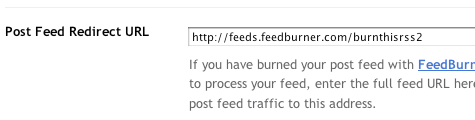
Blogger can make sure all feed traffic for your blog content goes to your FeedBurner feed. This helps make sure your FeedBurner stats are comprehensive and accurate; even subscribers to the 'Original Feed' are routed through FeedBurner. To redirect your feed:

  1. In a new browser window, sign in to your Blogger account.

  2. From the Blogger Dashboard, click the Settings link for the blog you want to promote.

    The Settings page for your selected blog should appear.

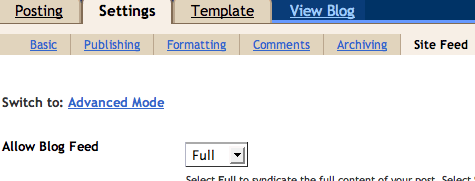
  3. Click the Site Feed link under the Settings tab.

  4. Type your complete FeedBurner feed address into the Post Feed Redirect URL text field. Make sure you type in your entire feed address including the "http://" portion.

  5. Click Save Settings.

    You should see the message "Settings were Saved Successfully".

  6. Blogger will now redirect all feed traffic for your blog to your FeedBurner feed.

Feedburn with me

I am setting up Feedburner today. Believe it or not, I have not done this yet.

Blogitalls all say to do it to increase traffic and offer an alternative to feed services. So, I am giving it a whirl.

FeedBurner is the leading provider of media distribution and audience engagement services for blogs and RSS feeds. Our Web-based tools help bloggers, podcasters and commercial publishers promote, deliver and profit from their content on the Web.


If you publish a blog, you publish a feed. A feed is the format that allows your content to be delivered (and subscribed to) on the Web.
Feedburner says they can help your blog in the following ways;
1. Publicize your content and make it easy for people to subscribe.
2. Optimize distribution so that your content is properly formatted for all of the major directories and can be consumed by subscribers wherever they are.
3. Analyze your traffic to learn how many subscribers you have, where they're coming from and what they like best.
4. Make Moneyitize by participating in the FeedBurner Ad Network. Why not reward yourself for your effort?

How do I create a Blogger Feed?

Here are the directions that I followed.


  1. Enter your blog's web address in the "Ready to Burn?" form found on FeedBurner's homepage and at the bottom of the pages in the Blog and Podcast sections. If you plan to publish a podcast with your Blogger feed, check the "I am a podcaster" box. Click Next ».

    The Identify Feed Source page should appear.

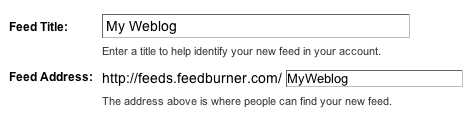
  2. On "Welcome", make sure the title and FeedBurner address (URL) of your new feed are values you prefer.

    The Create or Sign In To Your FeedBurner Account page should appear.

  3. Also on this page, create a FeedBurner account by picking a username and password and supplying your email address.

    When you've supplied all the required information on this page, click Activate Feed ». A "Congrats" page should appear.

  4. Read all of the information on "Congrats", then click Next » to continue with the setup process.

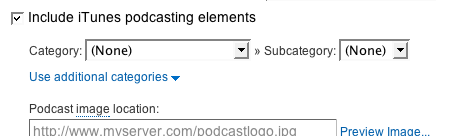
  5. If you selected "I am a podcaster" on the homepage, configuration options for our SmartCast service will appear. Here you can supply categories and other information for iTunes, append a copyright message, and submit your podcast to Yahoo! Search.

    When you are finished, click Next ». Configuration options for FeedBurner stats services should appear.

  6. On the stats configuration page, select the level of feed stats detail you want.

    Click Next » to finish the setup process and enter our feed management interface.

    You're now ready to make your FeedBurner feed available on your Blogger site!

My Feed.

http://feeds.feedburner.com/ KubricksPicksorg

Increase Traffic

If th intent of your blog is to make money, promote something, prove to the world that you have some great knowledge, or to be noticed, traffic matters.

If your blog is simply there to show pictures of the kids to grandma or to fulfill a class requirement, you may not want traffic. Seriously consider going to your settings tag and make sure that you have indicated for Google to NOT share your blog on their listings and to NOT promote it in search engines.

Want to know how to get more traffic? Read on.....


First of all, make sure that you have indicated in your basic setting tab that you do want your blog added to the Google listing and you do want it used in search engines. This is an easy given.

You can pay for promotion using Google AdWords or Yahoo or another internet option. There is a price to pay for the Google option and with good reason. How many times today have you Googled? Yahoo is a good alternative and is much less expensive. However, keep in mind that using Google allows you the chance to become one of those AdWord advertisements on someone else's blog.

Obviously, you want to write often. This comes down to the pinging thing and every time you write you get pinged. The more the better. Just make sure that your posts make sense, aren't redundant, and are well written. Make the reader want to come back or tell everyone else about you.

Take advantage of those free search engine submissions. Read this post for ideas.

Make friends. After you post, cruise through blogger and leave comments on other's blogs. Join communities. Start or join a blog roll.Get social and join a social network.

Offer an RSS feed (make it easy too by adding extra buttons).

Links, tags, labels and trackbacks are great to use because search engines pick these up.


Hope these ideas helped you. If you have any, please let me know.
kubrickspick@gmail.com


site submission

Free site submission can be a good thing. They will submit your website url to search engines. Usually all you have to do in return is post a link to them. They often offer upgrade serves for a fee.

You can always submit free to Google,
Yahoo
AOL

Here are a few more;
(Be sure to read the fine print prior to submitting)

Google Website Optimizer

Google now offers a great service for small businesses with websites.
Website Optimizer will help you study the effects of different content on your users. Testing will enable you to identify what users respond to best so you can create a website that will be more effective in getting the business results you want.
  • Increase website conversion rates
  • Decrease visitor bounce rates
  • Increase time spent on your site
  • Increase visitor satisfaction
  • Eliminate guesswork from site design

Why guess what site content and designs best convert your visitors, when you can find out directly from them?


Choose the pages and content to test
Using our web-based interface, provide us with the content -- headlines, images, or text, for example -- and design alternatives that you’d like to test.

Test these changes with your visitors
Website Optimizer will then show these content and design alternatives to your site visitors, all the while monitoring which combinations lead to the highest conversion rates.

Learn what changes drive the most conversions
Our intuitive reports allow even the mathematically-challenged to quickly and easily identify and implement the best combination.


Free web application
Begin driving more conversions and revenue from your website without purchasing and licensing costly software. Sign up now and begin your first experiment in minutes.
A/B Split & Multivariable Testing
Identify your most effective site elements. Test everything from individual copy blocks and images to complete page layouts.
Designed For Marketers, By Marketers
Your time is valuable, and small changes can drive big results. So we’ve designed Website Optimizer to require minimal IT support, giving marketers greater control, flexibility, and speed.
Intuitive Reporting
You shouldn’t have to be a mathematician to conduct even the most complex of tests. Our intuitive graphical reporting interface tells you exactly how each aspect of your test is impacting the bottom line, helping you to remain focused on your business.

The Meta Element

Meta tags are located in the head of your html code. The head element contains general information about a document.They are used by search engines to index your site based on your keywords and descriptions.

It is very important to use META Tags if you expect to be found in most search engines. META Tags are not the only thing search engines will look at when ranking your sites. Some search engines will ignore META Tags completely. Most search engines will also index your body text.

Meta elements provide information about a given webpage or blog most often to help search engines categorize them correctly. They are not visible to visitors but, they are important in getting them.

Search engine optimization (SEO), rely on meta data to correctly classify a web page . Search engine optimization can improve search engine ranking,and thus, more visitors .

To add meta tags, go to the html link from your layout tab. Back up your template. Search for meta by hitting control + f (most browsers) and enter meta in the box.
Copy and paste the code below. You will need to add a greater than sign before the meta aaaand the less than sign<> after the " at the end.

Here are some meta tags you would probably want to add to your site.

This meta element defines keywords for your page:

meta name="description" content="Your description should be no more than thirty words and include some of your keywords."

meta name="keywords" content="place keyword phrases, not single keywords, descriptive keyword phrases, place keyword phrase here"


If a description tag is not found on your page, the first words of your page copy could be shown in your listing. This is what is shown when someone does a search engine search and results pop up.


Other tags you might want to include to tell the
spiders and crawlers to index the page:


meta name="GOOGLEBOT" content="INDEX, FOLLOW"
meta name="ROBOTS" content="ALL"


Site Meter


Would you like to know how many hits you are getting and other details?

Site Meter offers a free basic package and a premium package starting at $6.95/mo.
Site Meter's comprehensive real time website tracking and counter tools give you instant access to vital information and data about your sites audience. With our detailed reporting you'll have a clear picture of who is visiting your site, how they found you, where they came from, what interests them and much more.


Site Meter will send you reports as well . The premium package is for sites wanting to track 4,000+ hits.

Site Meter tracks page views and visits. You may also have heard the term "hits". When someone comes to your site, they generate a "hit" for every piece of content that is sent to their computer. Viewing a single web site page would generate one hit for the page and one hit for every individual graphics file that was on the page. A single page could easily generate a dozen or more hits. When you are browsing a site, every time you follow a link, it is treated as a single "page view". Site Meter defines a "visit" as a series of page views by one person with no more than 30 minutes in between page views.


Site Meter

Visit and Leave Comments

Take advantage of the nav bar to surf the other blogs out there. Blogger loads them randomly for you. Be prepared for many language differenced. 

When you look at other blogs, you get ideas for your blog. There are some really well done blogs to look at. 

While you visit, it is important to leave comments. Not only will you make new friends :), but you will have a potential visitor your blog. 

Leave a quality comment like "Nice job, enjoyed your blog" or "nice photos". Blogger will automatically put a link to you when your name is posted on your comment.

Submit your blog to a directory


I do not endorse or not endorse any of these sites specifically. I am only giving you a reference. The more your you submit to more likely you are to get visitors. I would suggest that you stick to the low or no 0bligation sites.