Main Page Beginners Design Tips Get Traffic Earn Money Picks Codes

Are you a Successful Blogger?

Successful Blogging

  • Beginners can learn the basics about Blogging
  • Advanced Bloggers can learn how to take their blog up a notch.
  • Anyone can learn HOW TO GET MORE TRAFFIC
  • And more- Templates, Codes, and Tips etc.

What do you want to read about? Scroll down or check out our sidebar for topics.

We post at least daily so check back or subscribe to our newsletter.

Successful Blogging.com

Showing posts with label Blogging for Business. Show all posts

Promote your business blog

This post is in conjunction to a series of posts concerning using a blog as your business website. For information on the related posts, visit the links below.
Gadgets to add to your business blogger blog.

Your Business Blog- Header Image

Customizing your business blog

Starting a Blog "Website" for your business

Use a Blog for Your Business Site

Extra Items to Add to Your Business Blog
Once you have your site up and running, it is time to promote it and let the world know that your site exists. Here are some tip to help promote your new blog website.

Start off by getting a domain name. .
I recommend GoDaddy. Domain name registration is easy and cheap to do with GoDaddy. They will show you how to point your domain name to your blog . Check out the prices there too!
GoDaddy.com $6.95 .com Sale 120x90


20 ways to promote your business blog website.
  1. Make sure that your domain name is relevant to your business. The easier it is to remember, the more likely people will be to use it.
  2. Add your Domain name to everything. Get new business cards and stationary if you need to. It will be worth the investment.
  3. Promote your newsletter. You can do this simply by placing a reminder on invoices or have a sign-up sheet at your place of business.
  4. Advertise locally. You may need to spend a little to do this. Consider your local paper, programs for productions or sporting events, and local sponsorships.
  5. Internet advertising. Google, MSN, and Yahoo are good places to start. You can narrow the target views to your local area.
  6. Mention your website to your local affiliations. This includes Chambers of Commerce and clubs.
  7. Invent a contest that has people visit your site to find results or to sign up.
  8. Give something away on your site. Coupons and "deals of the week" are both good examples.
  9. Write a press release and send it to all local media members.
  10. Write an article and submit it to papers or local websites and blogs.
  11. If you have been published or have gotten publicity, get permission from the publisher to post a copy of it on your site.
  12. Start a list of people who would like to receive e-mails when you post coupons and specials.
  13. Be sure to list your website on listings such as telephone directories.
  14. Submit your site to Google Local and Yahoo local.
  15. Host a website launch celebration or party.
  16. Have a reason why people would want to visit your site. For instance, allow people to submit photographs or artwork to your site.
  17. Invite a local figure to be a guest blogger.
  18. Make sure that your site's domain name is on everything that has your business' name.
  19. Put your domain name on your business window, door and/or wall in large print.
  20. Use e-mail addresses for you and your employees that contain the domain name in it. Also, add it the the signature of all outgoing e-mails.



Extra Items to Add to Your Business Blog

I have been posting a series of blog posts that are focused around using a blog as your business website.

Gadgets to add to your business blogger blog.

Your Business Blog- Header Image

Customizing your business blog

Starting a Blog "Website" for your business

Use a Blog for Your Business Site

In this post, I will give you five extra touches that you can add to your blog to make it look like a website for your business.

1. Remove the Nav bar. The nav bar ins the bar at the top of your blog page. It is intended to be a navigation tool between Blogger blogs. Keeping it will make your blog look like a blog. Removing it will make your blog appear more like a website.
In order to remove it you need to go to the html link on your layout tab. Do a search (control +F most browsers) for </b:skin>

Paste the following code right before the </b:skin>.
</b:skin>.#navbar-iframe {  height:0px;   visibility:hidden;   display:none}


2. Make a Newsletter.
There are sites that can help you. Feedblitz.
and Feedburner are two popular services to check out. Once you sign up, they do all the work. All you need to do is add their widget to your site. You can set your preferences for the newsletter to go out daily, weekly etc. And, it can be done for free. When visitors sign up via your site, they will receive your newsletters which contain your posts.

3. Add a text or html with links Gadget to the bottom of your page that has essential links. You can easily model this after any professional website. Visit a few and see what they have at the bottom of their pages to get ideas

4. Visit a map service such as Mapquest and get the code to add directions to your physical business.

5. Add something local, such as a weather gadget. You can get this by using Blogger in Draft , go to your layouts tab, and add a gadget. Do a search for weather. There are currently 118 gadgets for weather so you may want to specify your location. Other sources for weather gadgets may be from your local TV station or Weather.com< There are many more items that you can add to your blog to make it look like a website. The key is to not add too many as they may take away from your message or slow your load time down.


Gadgets to add to your busines blogger blog.

This post is in conjunction with a series of posts concerning using a blog as a business website.

The gadgets that you add to your blog should be information and promotional.
Informational gadgets should give the visitor the information that the reader wants to know about your business, you and your products. Promotional should promote your business, you and your products. Sticking to these guidelines will help you stay focused in your efforts.

Normally, I do my blogger work using my regular blogger dashboard. The older version of blogger seems to get along better with Firefox. I get fewer, if any, error messages. Using blogger in draft becomes frustrating when you get the error messages and have to deal with a Blogger Group, and only a Blogger Group in an attempt to get help, which is rare.

Once you have signed in, access blogger in draft . Go to your layouts tab and then page elements.
If you click on "add a gadget" you will see a plethora of gadgets to choose from. There are way too many to mention here.

The Gadgets that best promote and/or inform include;

Basics


Blog List Blog List Nice idea if you or co workers have a blog. You can do specialty departments. This list allows you to add snippets of information.


Subscription Links Subscription Links Let your readers easily subscribe to your blog with popular feed readers

Search Box Search Box ( Search over your blog, your blogroll, and everything you've linked to.

Poll Poll Survey your visitors by adding a poll to your blog.
You can ask potential clients what they would like to learn about or see.


Link List Link List Add a collection of your favorite sites, blogs, or web pages. You can use it to link to different associates or departments.

Picture Picture Add a picture from your computer or from somewhere else on the web. Great for promoting a product or building location of your business.


Text Text Add some words to your blog - like a welcome message - with our rich text editor.

HTML/JavaScript HTML/JavaScript Add third-party functionality or other code to your blog. This is useful if you are going to add something like a link to a professional organization or badge.

Feed Feed Add content from an RSS or Atom feed to your blog.
So easy to do and acts like a subscription RSS newsletter from another site.

Labels Labels Show all the labels of posts in your blog.
I prefer this to Archive as labels look less 'bloggy'.


Profile Profile Display information about yourself or your business.


Blog Archive Blog Archive Display links to older posts.
Useful if you will be doing a "how to" or similar blog.

Page Header
Page Header
Probably Already added Display your blog's title and description.


Many of these items allow you to use your imagination to use them in a different way that best meets your need. Take a look at them and they may help spark an idea.


RealNetworks

Your Business Blog- Header Image


This is another installment in my series of posts about using a blog for your business website.
If you have missed the others- check them out.
When your website or blog first loads, the first thing that the visitor will see is the header. This is their introduction to your site. And because first impressions can make or break you in the business world, your header can be important.

Your header should give the most basic yet, important information about your site. For your business, this would mean the name of your business first and foremost. Other items that you may want to include depending on the nature of your business, are;
  • Contact Information
  • What your business does or sells
  • Your business location.
If your business is of a serious nature, you may not want to use an image. If you have a logo, you may want to use it here, alone or as part of a larger image.

You can easily make your own header image if you have the software. Another option would be to hire someone, like a graphic designer, to make a custom image with logo for you. There are internet sites that you can use to download an image for free.
Here are a few of them;


Setting your header properties is easy in Blogger.
Simply click on the layout link from your dashboard, click on the edit button on the header element. Here is where you can modify what you have, upload an image and decide on using the image with or without a title and description. A good idea for the beginner would be to download a free header image from one of the sites above, upload it to your layout, and then customize it with your information. You can get more specific later on.

Experiment with the different options to get the header that you like best. You may want to ask other for their opinion as well.

Starting a Blog "Website" for your business

I recently wrote a post about why using a blog format for a business website is a good idea for a small business or someone wanting to get a taste of having a website.

Here are some tips on getting it started.

Google has a lot of nice apps and other tools that may be nice to investigate down the road.
Blogger is the easiest Blogging software for the beginner. For now, this is all free. However, down the road, you'll probably want to obtain a domain name, which you can use for both Blogger and Google.

  • I will focus on the Blogger account now since it is the topic at hand. Go to your Google homepage. At the top you will see links Web, Images, Links etc. Click on "More" and scroll to the bottom of the list to "even more" or you can click here.
  • Now Click on Blogger BloggerBlogger

  • You will be directed to the Blogger homepage. You'll need to click on "create a Blog." You will be guided through a series of sign-up questions. One important thing to keep in mind at this stage is the name of your blog. It is the one thing from this sign-up that you cannot change and it is important to choose the right name for your blog.


  • Choose the Minima template as it is pretty easy to work with. If you don't like it, you can easily change your template later on.
Your goal is to make your blog look less like a blog and more like a website. This is easy to do with customizing your layout and settings. I will discuss this in my next post.


Blogtimize - Optimize the ads on your blog

Has any blog ever made $1,000,000 from adsense?

Hmmm, probably a few. However, certainly not all.
You can make your blog pay for itself though through smart optimizing.


Google offers these tips for blogger.

Blend ads into your blog

To increase the likelihood that your readers will see and click on your ads, blend your ad units into the background of your blog. Choose a bold color for the ad title to help draw attention to your ads, then make sure that the background and borders of your ads are the same color as the background of the area where the ad is placed.

Map

Experiment with multiple ad formats and locations

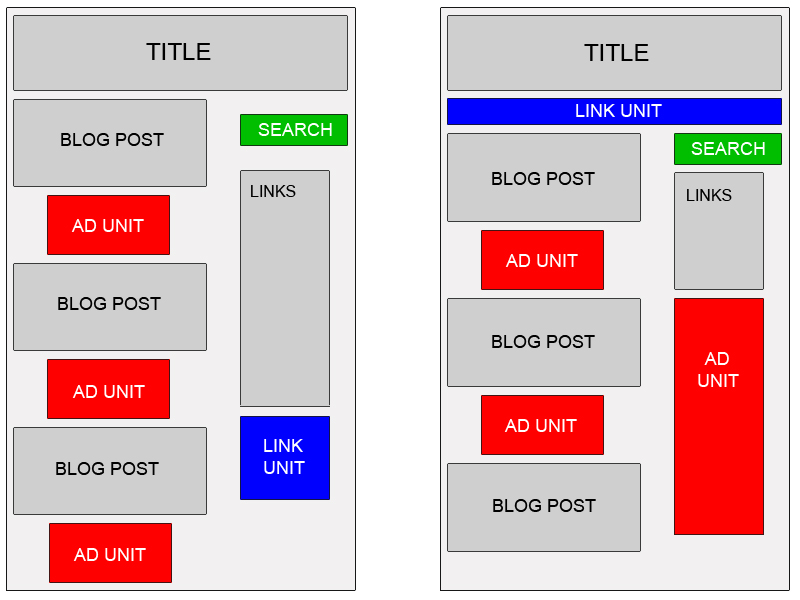
In general, wider ad formats tend to be more reader-friendly. Placing an ad unit after the first post will likely catch your readers' attention. Take a look at our sample implementations to get some ideas. Also, consider placing a Skyscraper (120x600) or vertical link unit on the right side of your blog.

Offer readers more options with search and referrals

To make sure you're earning the most revenue possible with AdSense, go beyond just ads to use AdSense for search and referrals. You can increase your earnings, provide readers with valuable information, and take advantage of flexible formats.

Improve ad targeting

With section targeting, you can target an ad unit to a specific section of your blog, as well as block out irrelevant sections like navigational links. We recommend that only those familiar with HTML attempt to implement section targeting.

Blogging for Business

This is a day-long event, which is designed for marketing professionals and business executives. It will be held June 6, 2008, at the Red Lion Hotel in downtown Salt Lake City (161 West 600 South, Salt Lake City, UT 84101).
General registration for the Blogging for Business (B4B) Conference is now open.

Presenters will focus on various aspects, both theoretical and practical, of engaging key publics through blogs, the most recognized form of social media.

"Blogs have become a critical tool to get messages to and interact with key audiences today. This conference is intended to help marketers and business leaders more effectively plan, deploy and maintain an online media strategy -- either their own blog or by engaging the audiences of others -- that will profit their organization," said Matthew Reinbold, conference organizer.

This year's conference keynote speaker will be Christopher Barger, General Motors Corp.'s Director of Social Media. GM recently made headlines by announcing that they would commit $1.5 Billion, or half of their yearly advertising budget, to online marketing efforts. Barger will share insights into effectively handling this large, unprecedented online marketing budget.


Blogging for Business Conference Matthew Reinbold, 801-953-3805 matthew@b4bconference.com or Politis Communications Kristofer Beldin, 801-523-3730 or 801-870-4064 (cell) kbeldin@politis.com